
'AI prospecting' can mean anything from a bought list to a bot that floods LinkedIn inboxes. An outbound agent is different. It answers questions in plain English, does the research a rep would otherwise do by hand, shows its evidence and prepares the next step. A person decides what happens next.
Here is how one works, from the moment something starts it to the point where an action is logged back in your CRM.

1. Something starts it
There are three kinds of trigger. A rep asks a question, such as 'Who should we contact this week?'. A schedule runs it at a set time, such as 07:45 on weekdays. Or an event fires it, such as a form being filled in on your website or a prospect replying to a message.
2. The agent plans the steps and calls tools
The agent is built on Claude. It works out which information it needs, calls the tools that hold it and reads the results before deciding what to do next. It chooses the order itself, so a question about renewals and a question about new prospects take different routes through the same tools.
- CRM and pipeline. Customers, open deals and renewal dates, so existing customers and live opportunities are handled correctly rather than prospected again.
- Prospect data. Licensed company and contact data, from providers such as Lusha or Vibe Prospecting, to find businesses that match your ideal customer and their likely decision makers.
- Marketing channels. Email campaigns, Google Ads, social and LinkedIn activity, so the agent can see who has engaged with you.
- Market signals. Web research with sources: hiring, office moves, new contracts, leadership changes and regulatory deadlines that create a reason to call.
The agent is designed so that every number it shows comes from a tool result, not from the model's memory. Which signals are available depends on the connected services, licensed data and platform permissions, so we agree the sources and coverage before setup. Paid data lookups can be capped per question and confirmed before they run.
3. It produces outputs, not actions
The agent's output is a set of recommendations for a person to review: ranked leads with the reasons for each score and the likely need, the decision makers to approach, and draft outreach with a short call briefing. A score is a way to prioritise. It is not a prediction or guarantee of a sale, and a rep can disagree with it and say why.
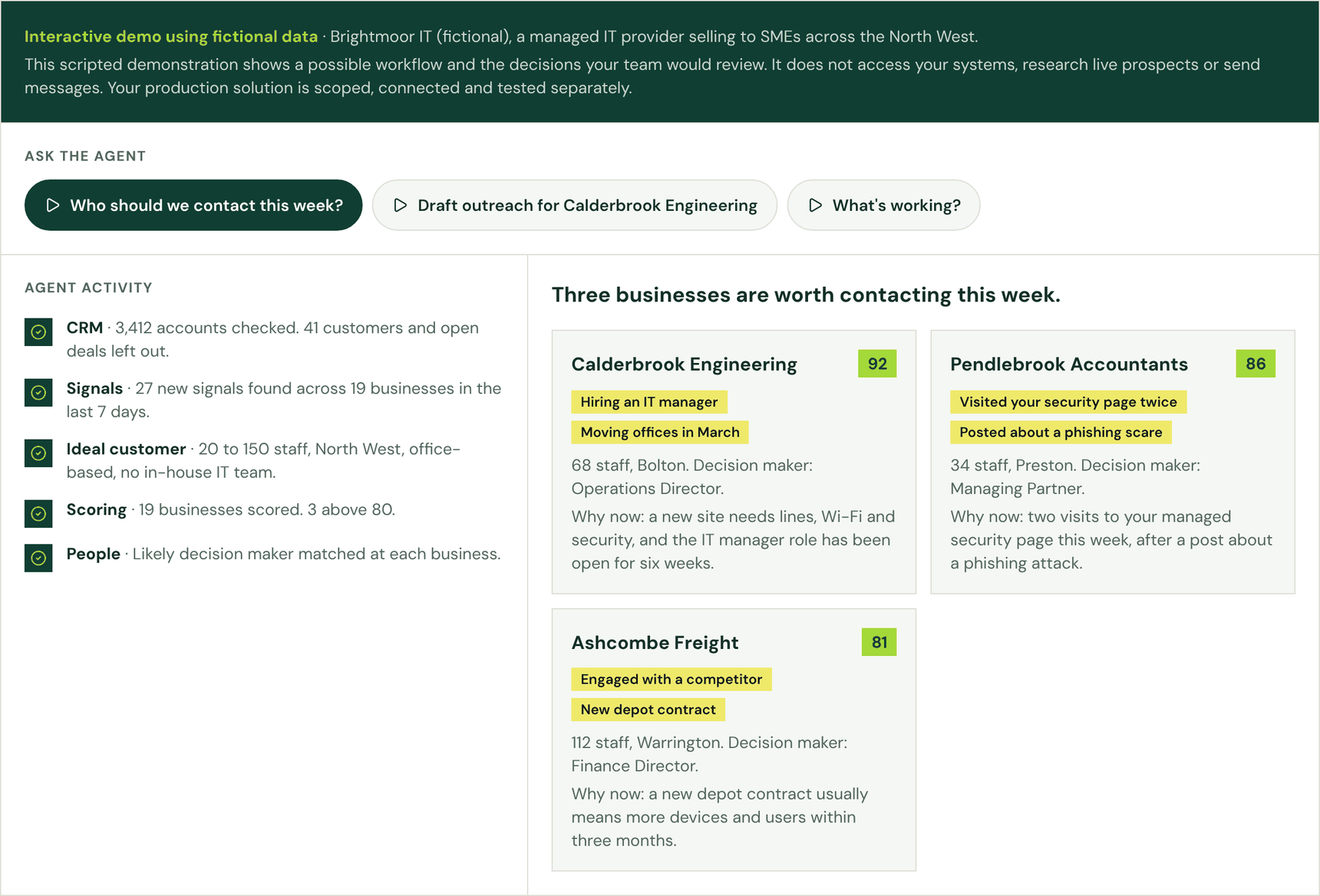
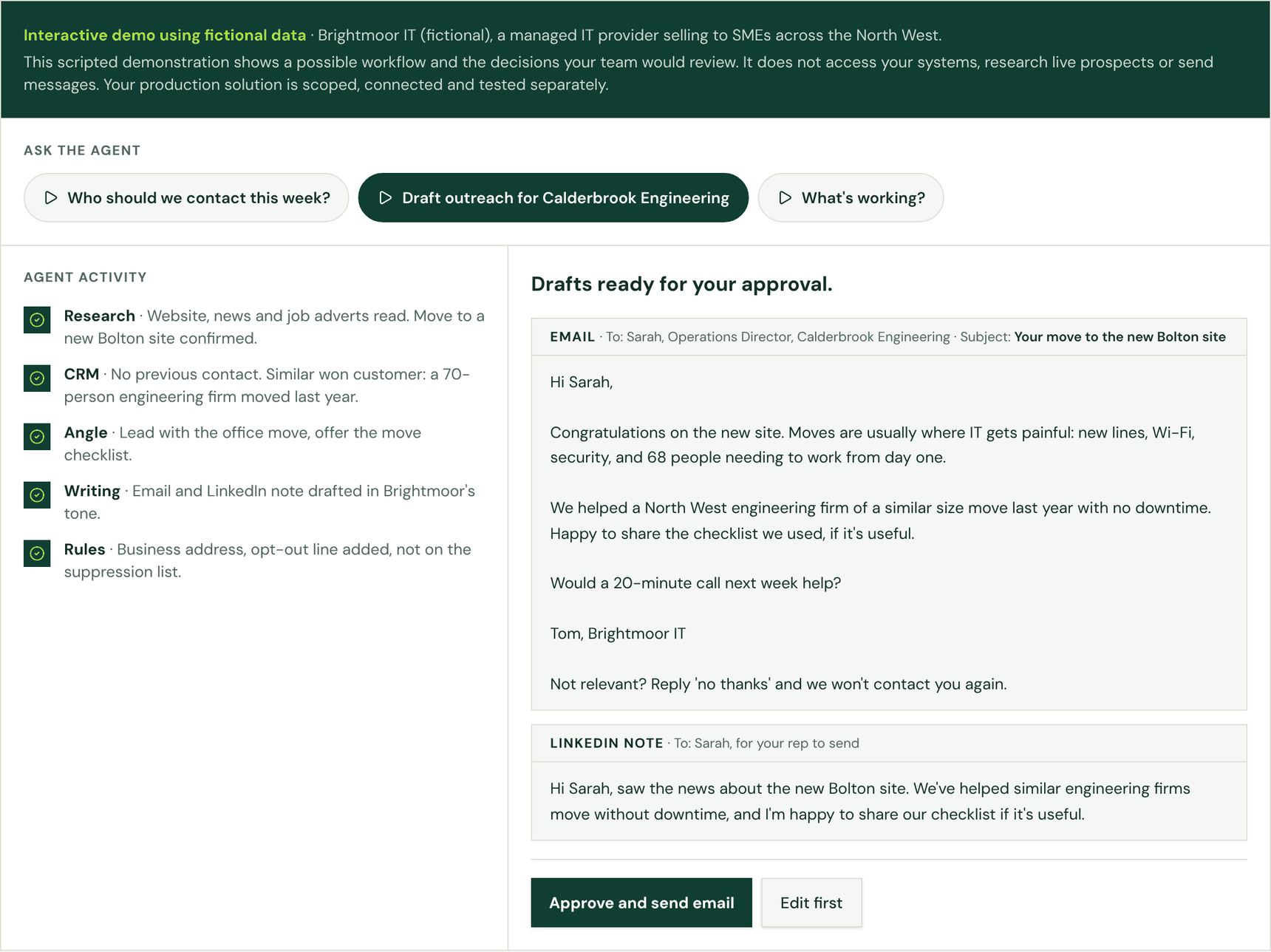
Fictional example. Brightmoor IT, Calderbrook Engineering and the other businesses below do not exist. The screenshots are from our interactive demo.
Brightmoor IT, a managed IT provider, asks 'Who should we contact this week?'. The agent checks 3,412 CRM accounts, leaves out 41 existing customers and open deals, finds 27 new signals across 19 businesses and scores three above 80. Top of the list is Calderbrook Engineering: 68 staff in Bolton, hiring an IT manager and moving offices in March.
4. A rep approves every write or send
Nothing reaches a customer or the CRM without a rep's approval, unless you later agree a specific segment that runs on its own. In the example, the agent drafts an email and a LinkedIn note that lead with the office move and offer a move checklist. The rep reads them, edits one line and approves. LinkedIn messages are drafted for your team to send, within LinkedIn's rules.
5. Actions are logged back into the CRM
Once approved, the action happens: a CRM task or note, an email or a LinkedIn message for the rep to send. Each one is logged against the account, so the next time the agent runs it can see what has already been done. Every tool call can be kept in an audit log, which makes it possible to check why the agent recommended what it did.
The agent working without being asked
Once the basics work, the same agent can run on schedules and triggers. These are typical examples to agree during a pilot, not features switched on by default:
- Morning briefing. Weekdays at 07:45: the accounts showing the most intent, renewals due and new market signals, sent to each rep. Read-only, so no approval is needed.
- Hot-lead alert. When a website form is filled in, or someone clicks two campaign emails in a week: the agent scores the company, finds the decision makers and drafts a reply that cites what they engaged with. The rep approves before anything is sent.
- Reply handler. When a prospect replies: a summary, a suggested next step and a draft response for the account owner to approve.
- Renewal watch. Daily, for customers within 90 days of contract end: a renewal brief covering what they hold, gaps, risks and who to speak to, added to the CRM as a task once approved.
- Weekly pipeline review. Mondays: deals with no activity for four weeks or a passed close date, with a suggested nudge for each.
- Market signal refresh. Monthly: the web research is re-run, changed facts and dates are flagged, and a person checks new signals before they are used.
These run on a scheduler that calls the same agent and tools, for example an automation platform such as n8n or Zapier, or a scheduled job. Anything that writes to the CRM or contacts a customer still waits for a rep.
Data protection is agreed before outreach starts
Before any outreach is enabled, we agree with you the intended audience, the data sources, the contact channels, the approval rules and how suppression works. We also check each data provider's terms for how their data may be used.
The appropriate UK GDPR basis and the PECR requirements are assessed for each campaign. Contacting a business is not a blanket exemption: email rules differ for corporate subscribers and for sole traders and some partnerships. Opt-outs and objections are honoured. The ICO's guidance on business-to-business marketing explains the rules.
What it will not do
- Start outreach before the audience, data sources, lawful basis and suppression process have been agreed.
- Send LinkedIn messages itself.
- Invent facts about a prospect. Every score and claim links back to its source.
- Replace your reps. It takes the research off them so they can have the conversations.
Three steps to a live pilot
- Connect real data. Your CRM, such as HubSpot, Salesforce or Dynamics; email and marketing channels; licensed company and intent data; and your product catalogue and pricing, so the agent can match needs to offers.
- Set guardrails. Approval before any CRM write or send, answers grounded in tool results only, and an audit log of every tool call.
- Measure a six-week pilot. Meetings booked per rep, pipeline created from agent-sourced leads and research time saved per account, compared with how the team worked before.
You can run the interactive demo yourself. It takes about a minute and uses fictional data.