Most business owners we speak to have been asked the same question by their team: which AI should we use? The answer is rarely one tool. It depends on where your work happens, what you already pay for, and what you want AI to do.
The short answer: if your team works in Microsoft 365, start by testing Copilot. If your work is long documents, analysis and careful writing, look hard at Claude. If people already use ChatGPT and you mainly want a flexible general assistant, ChatGPT may be enough. Many businesses end up with one main tool and a second for specific jobs.
Start with where your work lives
If your team lives in Outlook, Teams, Word and Excel, with files in SharePoint or OneDrive, Microsoft 365 Copilot sits closest to the work. It is a paid add-on per user, and its results depend on tidy files and sensible permissions, so those need sorting first.
If you run on Google Workspace, Google Gemini is the equivalent for Gmail, Docs, Sheets and Drive, and is less useful if most of your work happens in Microsoft 365.
Then think about the kind of work
Claude is strong on long documents, careful writing, analysis and building simple tools, with controls that suit business use. It sits outside your Office apps unless it is connected to them.
ChatGPT is a broad, general-purpose assistant your team may already know, with custom assistants for repeat tasks. It overlaps with Copilot, so paying for both needs a clear reason.
Why Claude's ecosystem is worth a closer look
Claude is no longer just a chat window. Alongside the web, desktop and mobile apps there is Claude Cowork, which works through multi-step tasks on your files and apps; plugins that package skills and connectors for a role such as sales, marketing or finance; Claude Code for building tools and automations; add-ins for Excel, Word, PowerPoint and Outlook; and connectors to tools such as Microsoft 365, HubSpot, Slack, Canva and Figma. The result is one assistant that can be set up differently for each team.
How it helps each department
- Marketing: the standout. Claude Design turns a brief into landing pages, social graphics, one-pagers and slide decks, and can follow your brand styles so assets stay on brand. Designs export to Canva for editing, or to PDF and PowerPoint. The marketing plugin adds campaign planning, content drafting, SEO checks and brand review.
- Sales: account research before a call, follow-up emails drafted from meeting notes, pipeline reviews from your CRM, and proposals that reuse your best past wording.
- Finance: variance commentary, model checks and month-end summaries, with Claude working inside Excel on the workbook itself.
- Operations: turning long procedures, contracts and supplier documents into checklists, comparisons and answers your team can trust, with the source quoted.
- Management: board packs and monthly reports drafted from the numbers and notes you already have, ready for a person to check.
Example: a presales helper for your sales team
This is the kind of helper we build. In Claude Cowork, we give Claude your product sheets, price list, case studies and standard terms as a team skill, and connect it to your CRM. A salesperson then asks for a first-call brief, a tailored proposal or answers to a tender's technical questions, and gets a draft grounded in your own material for them to check and send. Where the same steps repeat every day, we use Claude Code to turn them into an automation: reading new enquiries, preparing the brief and adding it to the CRM record before anyone opens it. A person still approves anything that goes to a customer. See our presales agent for how this works in practice.
Can you use more than one?
Yes, and many businesses do. A common pattern is Copilot for everyday work in Outlook, Teams and Excel, plus Claude or ChatGPT for a smaller group doing heavy writing, research or analysis. What matters is that each tool has a clear job, an owner, and a place in your AI use policy, so you are not paying twice for the same thing.
What about cost?
All three are priced per user, per month, on business plans. Copilot is an add-on on top of your Microsoft 365 licence, so the total is higher than the headline price suggests. Before buying for everyone, run a short pilot with the people most likely to benefit and check whether they actually use it after the first few weeks.
Automation and agents are a different decision
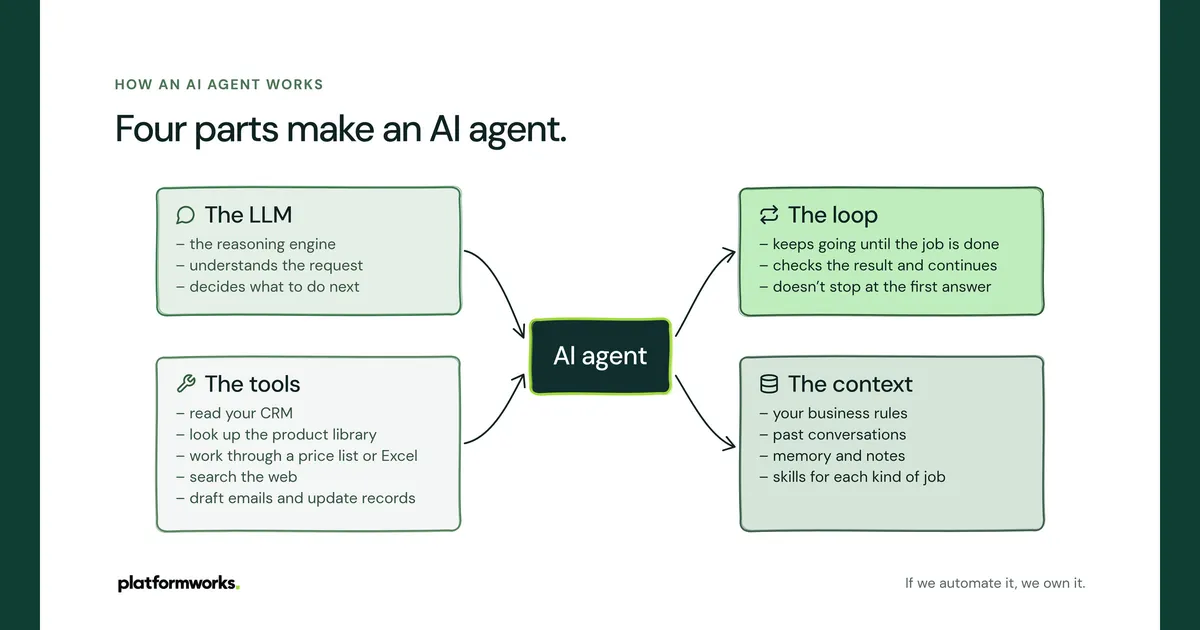
Some work should happen without anyone typing a prompt: checking an order against a quote, sorting a shared inbox, finding prospects that match your ideal customer. That is automation, joining systems such as your CRM and finance software. It needs design, testing and an owner, and it is a separate decision from which assistant your team uses day to day.
How we make the call with clients
- How your teams work and the tasks that eat time: email, documents, meetings, quoting, reporting.
- The tools you already pay for, and what you could stop paying for.
- Where your files live, who can see what, and what must never leave the business.
- Who is keen, who is wary, and what support they will need to use AI well.
That is what our AI assessment covers. You get the options compared for your business, the licences you need, expected costs, the data and risk points, and your top use cases ranked by value and effort.
Product features and licensing change often, and some Claude features (including Claude Design) are in preview and depend on your plan. Check the vendor pages linked below for current details before buying.