
AI assistants
An AI assistant
for everyone on your team
It works in each person's email, diary, CRM and files. It prepares the meeting, writes up the call, drafts the follow-up and reminds them what's slipping. Nothing goes out until they approve it.
A day with an AI assistant
You message it like a colleague. It does the admin.
Sam is an account manager. Her assistant lives in Teams. Some days she asks it for things. Other times it checks in on its own, first thing and at the end of the day. Everything that leaves the building waits for her OK.
Example on fictional data.
07:45
Assistant: Morning, Sam. 3 meetings today. Harbour Foods replied overnight about the delivery date, and the Kelso quote expires on Friday. I've drafted a reply to Harbour for you to check.
Morning briefing
09:20
Sam: Prep me for the 10:00 with Kelso.
Assistant: Done. One page: who's coming, what we quoted, the 2 open support tickets and the question they asked last time about lead times.
Meeting notes ready
11:05
Sam: Write up that call and send the actions.
Assistant: Notes are in the CRM. Follow-up email drafted to all 3 attendees with the 4 actions and owners. Send it?
Waiting for your OK
14:30
Sam: Find me 2 hours with Priya and Tom next week.
Assistant: Tuesday 2 to 4pm works for everyone. Holding it as tentative until you confirm.
Diary held
16:50
Assistant: Wrap-up: 6 emails drafted, 2 still waiting for you. Kelso hasn't answered yet, so I'll nudge you on Thursday morning.
Nothing dropped
What it looks like
One assistant, wherever you work
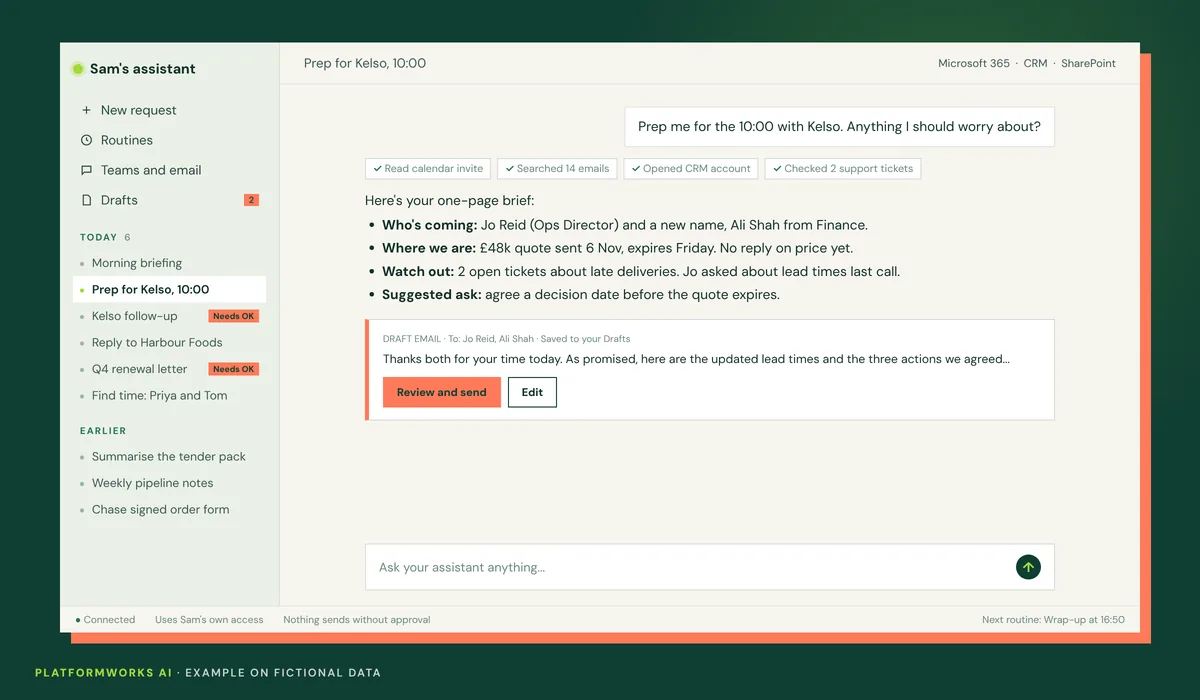
Ask it anything
It checks your calendar, email, CRM and tickets, then writes the brief and drafts the follow-up for you to send.
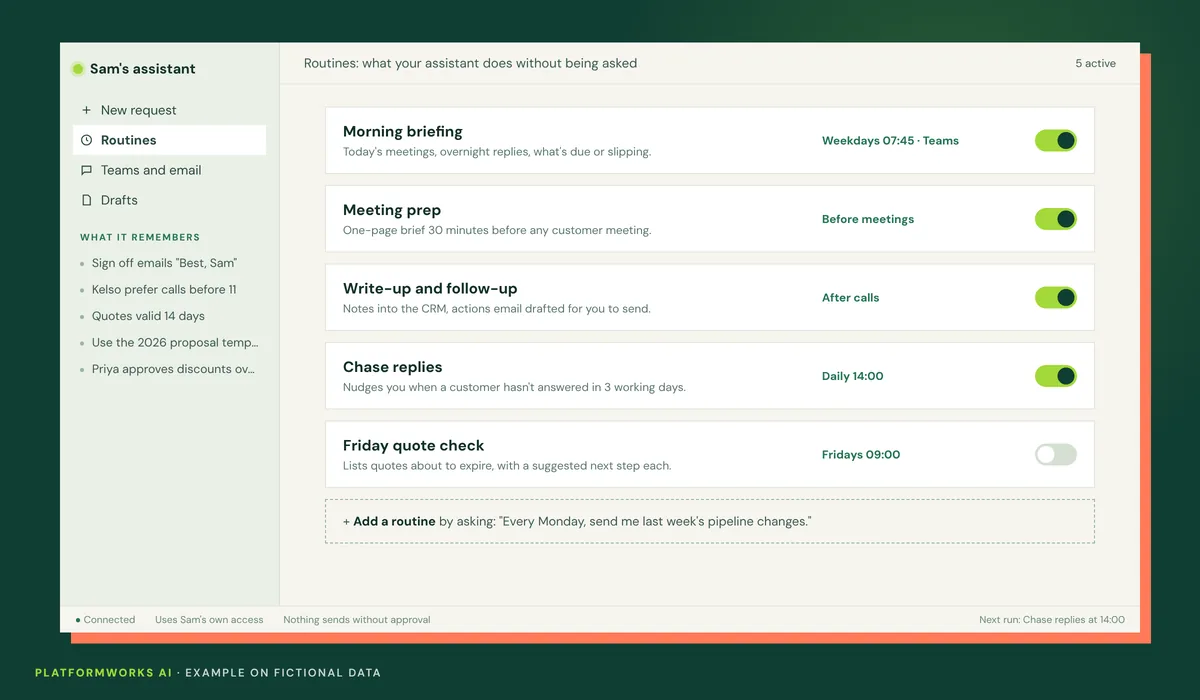
Routines it runs on its own
A morning briefing, meeting prep, write-ups and chasers, on a schedule you control. It also remembers how you like things done.
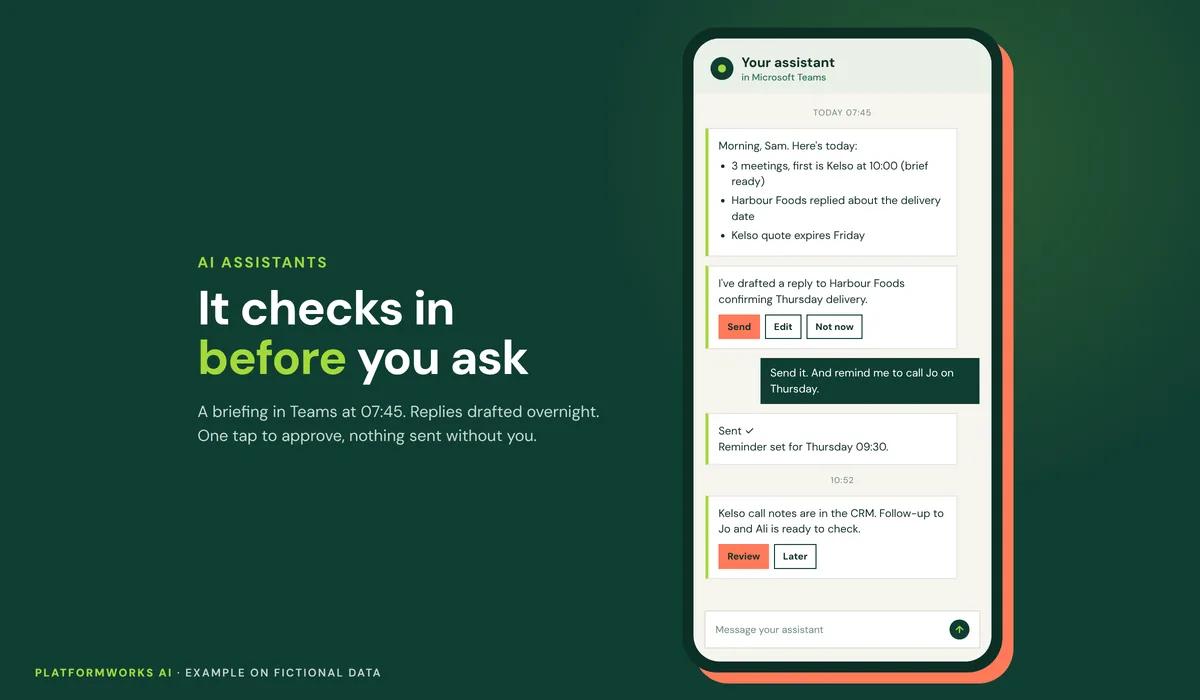
In Teams, on your phone
It checks in before you ask. One tap to approve, and nothing is sent without you.
Examples on fictional data.
What it works with
- Email and calendar (Outlook or Gmail)
- Teams or Slack, so you can just message it
- Your CRM
- SharePoint, OneDrive or Google Drive files
- Meeting transcripts
- Your templates, price lists and policies
What it never does on its own
- Send an email, accept a meeting or change a record without your OK
- See anything you can't already see: it uses your own permissions
- Spend money, sign anything or delete files
- Keep working after you switch it off
Where the idea comes from
Personal AI assistants are here. Most aren't built for a business yet.
You may have seen these. They show what an assistant can do. We build the same ideas on the business platforms you already trust, with admin controls and approvals.
- Hermes Agent
An open-source assistant from Nous Research that you can message from Slack, WhatsApp, Telegram or email. It remembers what it learns between conversations and turns a quick message into a scheduled job.
- OpenClaw
A self-hosted assistant that early users run to clear their inbox, manage their calendar and send a morning report. Reviewers also warn it needs technical set-up and broad access, which is a security risk.
- Salesforce employee agents
Salesforce calls them employee agents: assistants inside the software staff already use, for call prep, email drafts and CRM updates. Its advice is to start small.
More on these, and what to watch out for, in What an AI assistant could do for your team.
How we set it up
Start with a few people, for 30 days
1
Pick the people
2 to 5 people whose days are full of email, meetings and follow-ups.
2
Connect safely
On the AI you already pay for: Microsoft 365 Copilot or Claude. Their own permissions, your data rules.
3
Teach it the job
Your templates, tone of voice and routines: the morning briefing, meeting prep, the follow-up.
4
Use it for 30 days
We check in weekly, fix what gets in the way and measure the time saved.
From an assistant to a team of AI employees
Most clients start with assistants. Once people trust them, the repeated work moves to team-mates and agents.
Works for one person
AI assistant
Briefs, drafts and chases for you. You approve what goes out.
Works for a team
AI team-mate
Has a regular job, such as the shared inbox or Monday's report, on a schedule.
See ai team-matesRuns a business process
AI agent
Takes a process end to end, such as quote to order, with people approving the key steps.
See ai agents
Questions we get asked
- Is this just Copilot or ChatGPT?
- It is built on them. A licence gives everyone a chat window. An assistant is set up for a person's actual job: connected to their email, diary, CRM and files, taught your templates and routines, and checking in at set times without being asked.
- Will it send emails on its own?
- No. It drafts and you send. We set that rule in the system, not just in the instructions, and you can see everything it has prepared.
- Can it see everything in the business?
- No. It works with the same access the person already has, so it cannot open a folder or record they could not open themselves.
- Which AI does it use?
- Usually the one you already pay for. Microsoft 365 Copilot if you are a Microsoft business, Claude if you are not, or a mix. We will tell you honestly which fits. See choosing between Copilot, Claude and ChatGPT.
- What about open-source assistants like Hermes Agent or OpenClaw?
- They show what is possible and they are great for enthusiasts. For a business they usually mean running your own server, managing keys and giving broad access to email. We build the same ideas on platforms with business security, admin controls and UK data options.
Related
- What an AI assistant could do for your team
Real examples, the risks, and how to start small.
- Types of AI in business
Chat, cowork, code and agents, and what each platform offers.
- AI agents
Agents that run a process end to end, with your team in charge.
Free initial conversation